Custom API Integration Services: How Businesses Can Deploy AI Across Operations
Learn how custom API integration services connect AI with CRM, ERP, cloud, and business applications to automate workflows and improve operations.
Most companies that want AI do not have a blank slate. They have a CRM that holds years of customer history, an ERP that runs inventory and finance, a support desk, a data warehouse, and a handful of internal tools that someone built in 2017 and nobody dares touch. The AI model is the easy part. Getting it to read from those systems, act on what it finds, and write the result back into the place your team actually works is where projects slow down.
That connecting work is what custom API integration services are for. Instead of buying yet another standalone AI tool and asking people to copy and paste between windows, you build the integration layer that lets AI operate inside the systems you already run. This guide explains what that means in practice: how custom integration differs from pre-built connectors, how AI fits into the architecture, what security and reliability need to look like, what drives cost, and how to pick a partner who has done it before.
What Are Custom API Integration Services?
Custom API integration services design, build and maintain the connections between your business applications, and between those applications and external services such as AI models. The deliverable is not a new product. It is a working, monitored flow of data and actions between systems that did not previously talk to each other, or did not talk to each other in the way your business needs.
What Is an API Integration?
An API is the door a piece of software leaves open so that other software can ask it questions or give it instructions. An integration is the work of making two of those doors line up: sending the right data in the right shape, handling what comes back, and dealing with the cases where something goes wrong. When a new order in your shop creates an invoice in your accounting system without anyone typing, that is an API integration.
What Makes an API Integration Custom?
Custom means the integration is built around your data, your rules and your workflow rather than a generic template. A pre-built connector might sync a contact from one system to another. A custom integration might check that contact against a credit rule, enrich it with data from a third system, ask an AI model to classify the enquiry, route it to the right team, and log every step for audit. The difference is business logic. Custom work exists to encode decisions that only your business makes.
How Custom APIs Connect Business Applications
In practice this usually means an integration layer sitting between your systems. It authenticates to each application, translates between their data formats, applies your rules, and passes results along. Sometimes the layer is a small service. Sometimes it is a set of workflows on an orchestration platform. What matters is that it is a deliberate, owned piece of your architecture rather than a pile of one-off scripts. If you want the broader foundations first, our guide to API integration services covers reliability patterns such as retries, idempotency and webhooks in depth.
Custom API Integration vs. Pre-Built Connectors
Pre-built connectors are quick to switch on and cheap to run, and for simple jobs they are often the right answer. Custom integration costs more to build and takes more care to maintain, but it can do things connectors cannot: apply unusual business rules, handle awkward data, talk to systems nobody has written a connector for, and meet specific security requirements. We come back to how to choose between them later in this guide.
Why Businesses Need Custom Integrations
Because the interesting part of a business is rarely generic. The way you price a quote, approve an exception, or decide which customer gets a call first is yours. When software cannot express that logic, people carry it in their heads and do the work by hand. Custom integration moves that logic into a system that runs the same way every time.
How API Integration Enables AI Across Business Operations
AI integration is mostly about connecting models and AI services to existing systems, not treating AI as a standalone application that people visit. A model on its own can write a fluent paragraph. A model connected to your systems can read the actual customer record, check the real inventory, and put its answer back in the ticket where your team will see it.
The pieces are straightforward to describe. Connecting AI models with existing applications means your software can call a model through an API and receive a structured response. Connecting AI to business data means the model gets the context it needs, such as the customer's history or the relevant policy, retrieved at the moment of the request rather than copied into a separate tool. Automating AI-powered workflows chains these steps so a trigger, such as a new email, starts a sequence without a person pressing anything. Sending business data to AI systems requires care about what leaves your environment and in what form. Returning AI results to business applications is the step people forget: an answer trapped in its own dashboard adds a tool, while an answer written into the CRM record changes the workflow. And real-time AI workflows apply when the response has to arrive while a customer is still waiting, which puts hard limits on latency and failure handling.
For a wider view of how AI sits on top of existing software, see our guide to AI integration services for existing business software.
Why Businesses Use Custom API Integration for AI
There are a handful of recurring reasons, and most projects involve several at once.
Existing systems often have no native AI integration, or only a thin one that covers a fraction of what you want. Businesses have unique data flows: the same customer might live in three systems under slightly different names, and someone has to decide which record wins. Custom business logic is frequently required, because the useful version of an AI feature depends on your rules about who may see what and what counts as an exception.
AI also needs business context. A model asked to draft a reply to an unhappy customer is far more useful when it can see the order history, the open tickets and the contract terms. Often multiple systems need to share the result: a classification made in the support desk should update the CRM and notify the account owner. Security and access controls have to be managed, since an integration that can read everything is a liability. And finally, AI workflows need monitoring and error handling, because a model call is one more thing that can time out, return something unexpected, or cost more than you planned.
Business Applications That Can Be Connected to AI
Nearly any system with an API, a database, or even a scheduled export can be connected. The common ones:
- CRM systems are the usual starting point. The data is structured, the APIs are generally good, and sales teams see the benefit quickly through lead scoring, call summaries and follow-up drafts.
- ERP platforms offer high value and higher difficulty. Forecasting, procurement assistance and exception handling are all possible, but the systems are older and the data more sensitive.
- E-commerce platforms support product-data enrichment, support automation and demand signals.
- Customer support systems benefit from ticket classification, suggested replies, knowledge-base search and routing.
- Marketing platforms can use AI for segmentation, content workflows and campaign reporting.
- Financial applications can use AI for invoice and document processing, reconciliation hints and anomaly flags, with strong human review.
- HR systems often make a safe first project: internal audience, repetitive questions, cheap mistakes.
- Inventory and operations systems gain from forecasting and exception alerts.
- Data warehouses and analytics platforms can let non-technical staff ask questions in plain language, which needs careful query validation.
- Internal business applications of all kinds, including the ones with no documentation, can be wrapped with an API layer first and connected to AI afterwards.
AI Use Cases Enabled by Custom API Integrations
Integration is what turns a list of AI ideas into working features. The use cases we see most often:
AI-powered customer support answers routine questions and drafts replies for agents, grounded in real account data. Automated lead qualification reads an inbound enquiry, checks it against your criteria and routes it. AI sales assistance summarises accounts and drafts follow-ups from activity already logged in the CRM. Document processing extracts fields from invoices, contracts and forms and posts them into the right system. Automated data classification tags tickets, emails and records so downstream rules can act on them. AI-powered reporting assembles recurring reports and explains what changed. Customer data analysis surfaces patterns across systems that nobody had time to look for. Predictive business workflows flag likely churn, delays or stock-outs early enough to act. Internal knowledge search lets staff ask questions of policies and documentation. Automated content workflows draft and route routine content for human approval.
Some of these overlap with chat-style features. If a conversational assistant is your goal, our guide to AI chatbot API integration goes deeper on authentication, rate limits and fallbacks for that case.
How Custom AI API Integration Works
A well-run integration follows a predictable sequence. Skipping steps is where most of the pain comes from.
- Identify the business workflow. Start with the process and the pain, not the technology. "Support tickets take too long to route" is a brief. "We should use AI" is not.
- Identify the data sources. List which systems hold the data the workflow needs, who owns them, and how reliable they are.
- Select the AI service. Choose a language model, a classical machine-learning model, an OCR service or a combination, based on the task and on cost and latency. A small trained classifier often beats a large language model for sorting tickets.
- Design the API architecture. Decide how requests flow, where the integration layer lives, what is synchronous and what is queued.
- Build authentication and access controls. Decide which credentials the integration uses and what it is allowed to see and do.
- Map and transform data. Translate fields between systems and handle the messy cases: missing values, duplicate records, different date formats.
- Connect the AI API. Wire in the model call with sensible timeouts, retries and cost limits.
- Validate AI outputs. Check structure and content before anything reaches a user or triggers an action.
- Return results to business systems. Write the output into the application where people work.
- Monitor the integration. Track success rates, latency, cost and quality from day one.
Custom Enterprise API Integration Services for AI
Enterprise integration commonly spans CRM, ERP, legacy systems, cloud platforms, internal applications and third-party services at once. The challenge is less any single connection than the number of them and how they interact.
Connecting enterprise applications means agreeing on identifiers and ownership so that one customer is one customer across systems. Integrating CRM and ERP systems usually means careful handling of write operations, since a wrong update to an order or an invoice has real consequences. Connecting legacy systems with AI often means building an API layer around something that never had one, which we cover below. Integrating cloud platforms is usually straightforward when AI services run in the same cloud account as your data, because identity, networking and billing stay in one place. Connecting data warehouses lets AI work on analytical data without touching production databases. Managing multiple APIs means tracking versions, credentials, rate limits and owners for each one. Supporting high-volume data exchange calls for queues, batching and back-pressure so a spike in one system does not knock over another. Building scalable integration architecture means designing so that adding the sixth system does not require rewriting the first five.
Custom API Integration Service vs. Pre-Built AI Integrations
This is the decision that most affects cost, so it deserves honesty. Do not build custom if a pre-built connector does the job.
When Pre-Built Integrations Are Enough
If the vendor of your CRM, help desk or accounting package offers a maintained AI feature or connector that covers your need, use it. You get a supported product, automatic updates, and no code of your own to look after. A standard sync of contacts, a basic summarisation feature, or a straightforward notification flow rarely justifies custom work. Teams that build custom integrations for problems a connector already solves end up with an expensive thing to maintain and nothing to show for it.
When Custom Integration Is Necessary
Custom becomes the right call in a recognisable set of situations:
- Unique business logic: your rules for approvals, pricing or routing cannot be expressed in a connector's settings.
- Complex data structures: nested, inconsistent or multi-system data needs real transformation.
- Multiple application dependencies: one workflow touches several systems and must succeed or fail as a unit.
- Legacy system requirements: the system has no modern API and needs a wrapper.
- Custom security requirements: data residency, audit or access rules that off-the-shelf tools do not meet.
- Advanced workflow automation: multi-step flows with approvals, branching and exception handling.
If none of those apply, start with a connector. You can always replace it later with something custom once you know exactly what is missing.
AI API Integration Architecture
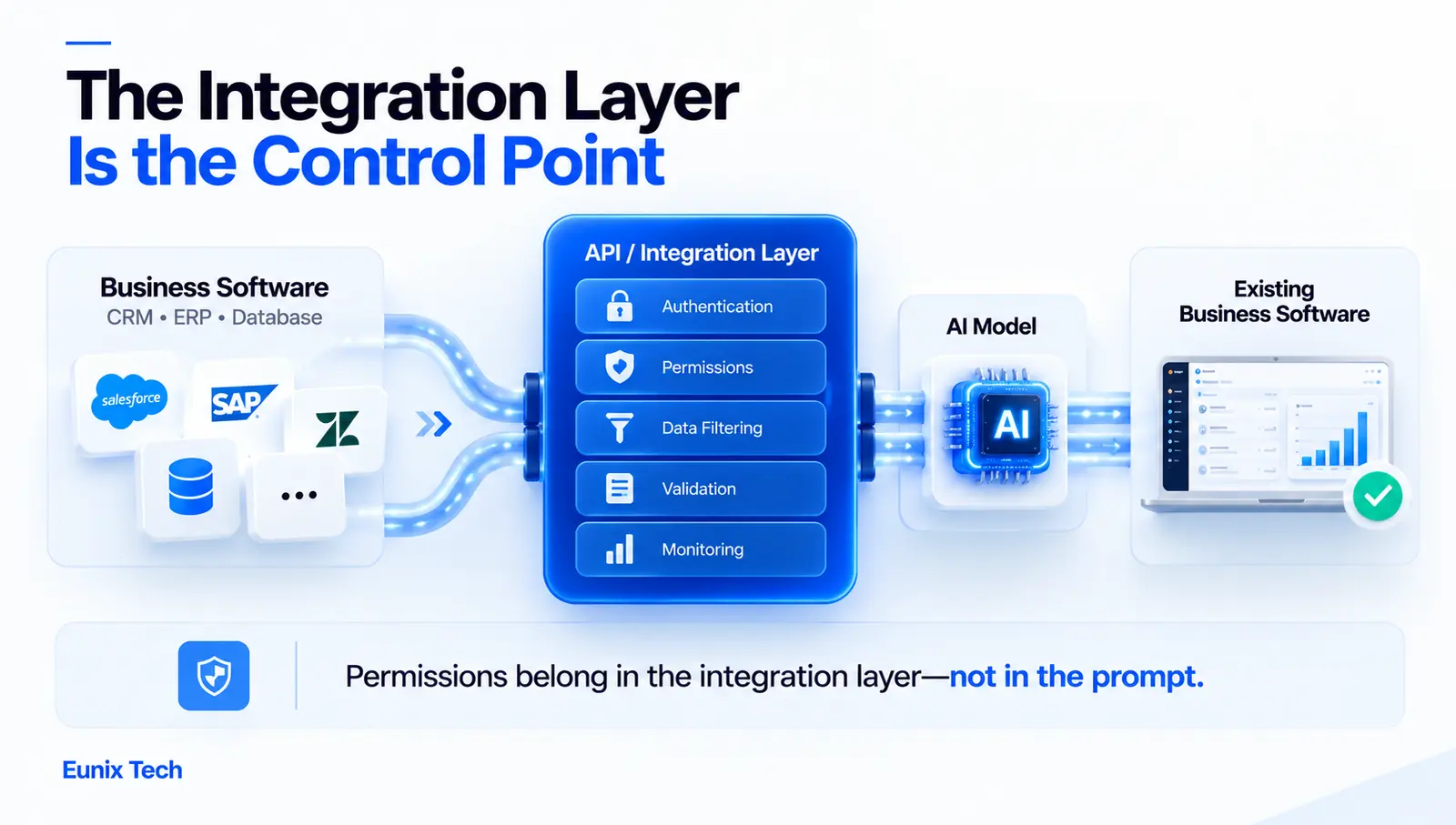
A useful architecture accounts for authentication, data transformation, error handling, monitoring and API lifecycle management, not just the model connection. A typical layout has these layers:
- Business application layer: the systems people use, such as the CRM, ERP or support desk.
- API integration layer: the service that mediates every request and is the control point of the whole design.
- Authentication layer: manages credentials and decides who or what may call what.
- Data transformation layer: converts between formats and filters data before it goes anywhere.
- AI model or AI service layer: the model, hosted by a provider or in your own cloud.
- Validation and business logic: checks outputs against your rules before they are used.
- Monitoring and logging: records what happened, how long it took and what it cost.
- Data storage and reporting: keeps the audit trail and feeds dashboards.
The single most important design decision is that the integration layer, not the prompt, enforces permissions and validation. A prompt instruction is a request to the model. An access control in the integration layer is a guarantee. We go deeper on this principle in our guide to LLM architecture.
Security Considerations for AI API Integrations
An integration puts a model in contact with real business data, so security is a design input from the first day rather than a review at the end.
API authentication should use short-lived tokens or properly scoped keys, never shared admin credentials. Authorization and access control should ensure the AI sees only what the requesting user is entitled to see, which is how you avoid leaking one customer's data into another's answer. Protecting API keys means storing them in a secrets manager, rotating them, and keeping them out of code and logs. Encrypting data in transit and at rest is a baseline, not a feature. Protecting sensitive business information means filtering or masking personal and confidential fields before they reach the model, rather than asking the model to ignore them. Data access policies should state which data may be sent to which provider and what the provider may retain, including whether they train on it. AI output validation treats model output as untrusted input: check it before acting on it. Logging and audit trails record every request, on whose behalf, and what came back. Monitoring API activity catches unusual patterns such as sudden spikes in volume or access to unexpected records.
How to Make AI API Integrations Reliable
Reliability is what separates a demo from a production system. Hosted AI services have outages, rate limits and slow days, and an integration with no plan for them will break the business process it was meant to improve.
Error handling should distinguish failures worth retrying from those that are not. Retry mechanisms need backoff and limits, and any retried write must be safe to repeat so that a retry never double-posts an invoice. Timeout management stops a slow model call from holding up everything behind it. API rate limit management means queuing and pacing requests rather than hammering an endpoint until it blocks you. Input validation rejects malformed data before it wastes a model call. Output validation checks that what comes back has the structure and content you expect. Fallback workflows define what happens when the AI is unavailable: route to a human, use a simpler rule, or queue the task for later. Monitoring and alerts tell you about failures before your customers do; our guide to API monitoring covers the practice in depth, and our API reliability work puts it into production. API version management handles the day a provider changes a field or retires an endpoint.
Custom API Integration for Legacy Applications
Legacy software is where custom integration earns its keep. You do not have to replace an old system to add AI to it.
Connecting AI to legacy software usually starts with finding the least risky access point: an existing API if there is one, otherwise a database view, a file export or a message queue. Building an API layer around legacy systems gives the old application a clean, documented interface that newer systems can call without knowing its quirks. Transforming legacy data means translating old formats and codes into something consistent. Connecting legacy databases needs particular care: use read-only access and dedicated accounts, never give an AI direct write access to a production database. Introducing AI without replacing the existing application lets you add value while the old system keeps doing what it already does well. Gradual AI modernisation then lets you replace components one at a time if and when it makes sense.
If the underlying system is itself the constraint, modernisation may need to come first. Our guide to legacy application modernization explains how to do that in phases without a risky rewrite, and our legacy modernization service covers the delivery side.
Benefits of Custom API Integration Services for AI
When integration is done well, the benefits show up in ordinary operations:
- Automate repetitive processes: routine, rule-based work happens without someone doing it by hand.
- Connect existing business systems: information flows where it is needed instead of being retyped.
- Reduce manual data entry: fewer errors and less time spent on copying.
- Improve data availability: the right data is reachable by the AI and by your people.
- Create AI-powered workflows: AI becomes part of the process rather than a separate tool.
- Improve operational efficiency: faster handling of tickets, orders, documents and reports.
- Support business scalability: volume can grow without hiring in proportion.
- Improve customer experiences: quicker, more accurate responses.
- Reduce data silos: a shared integration layer gives teams a common picture.
Common Challenges With AI API Integration
Most failures come from the same handful of causes. Inconsistent data limits AI performance more than model choice does: the uncomfortable truth of many projects is that the AI works and the data does not. Legacy system limitations such as missing or read-only APIs reshape what is possible. API rate limits can stall a workflow when volume grows. Security requirements add real engineering effort, especially in regulated industries. AI output reliability is the problem everyone knows about: incorrect or unsupported answers, countered by grounding in your data, validation and human review. Integration complexity grows quickly as systems multiply. Third-party API changes break integrations quietly. Data privacy requirements shape where data can go and what can be sent. Monitoring and maintenance are ongoing costs, and projects that budget only for the build are surprised by them. For the approach to measuring AI output quality, see our guide to LLM evaluation.
Custom API Integration Services Process
A structured process from discovery to deployment is the usual pattern for enterprise integration work.
- Discovery and requirements analysis: agree the business goals, the workflow and what success looks like.
- Existing system assessment: review the applications, their APIs and what they actually permit, the data and the security model. This step routinely changes the plan.
- Integration architecture: design the layers, data flow, failure handling and security.
- AI use-case selection: rank candidates by value, feasibility, risk and effort, and start with the one that is high value and low risk.
- Data mapping: define how fields translate between systems and how conflicts resolve.
- API development: build the integration layer and any wrappers.
- AI integration: connect the model and prompts, with validation.
- Testing and validation: test functionality, security, load, failure modes and AI output quality.
- Deployment: release in stages, with the ability to roll back.
- Monitoring and maintenance: watch, tune and update as systems and providers change.
How Much Do Custom API Integration Services Cost?
There is no honest single price, because "connect AI to our systems" covers a project that takes a few weeks and one that takes many months. We do not publish fixed prices for the same reason: a number quoted before scope is understood is usually wrong in one direction or the other. What we can do is show you what moves the cost, so you can judge a quote when you receive one.
| Cost driver | What it means for effort |
|---|---|
| Number of systems being connected | Each system adds authentication, mapping and failure handling |
| API complexity | Modern documented APIs are quick; old or restrictive ones take much longer |
| AI model or service requirements | Different models and hosting choices change both build effort and running cost |
| Data transformation requirements | Messy or inconsistent data adds mapping and cleaning work |
| Custom business logic | More rules and exceptions means more design and testing |
| Security requirements | Stricter controls, residency and audit needs widen the scope |
| Testing requirements | Business-critical flows need deeper validation |
| Monitoring requirements | Better observability means more build, and it pays for itself |
| Ongoing maintenance | A recurring cost that scales with the number of integrations |
| Legacy system complexity | Often the largest single source of uncertainty |
The two that most often surprise teams are API complexity and testing. A technical discovery, which means actually inspecting the systems, APIs and data involved, is what turns this table into a number for your situation. Our broader AI software development cost guide explains the budgeting framework without anchoring on example prices.
How to Choose a Custom API Integration Services Provider
The skill that matters most is not model expertise. It is experience connecting to real business systems, because that is where these projects succeed or stall. Look for:
- API development experience: a track record of building and maintaining integrations, not only prototypes.
- Enterprise integration experience: comfort with multiple systems, access controls and change processes.
- AI integration expertise: understanding of where models help and where plain rules are better.
- Security knowledge: specific answers about data handling, keys and audit, not general assurances.
- Experience with legacy applications: ask for examples where there was no clean API.
- Data integration capabilities: mapping, cleaning and reconciliation skills.
- Testing and monitoring: how they validate AI output and watch production.
- Documentation and support: clear handover so your team is not locked in.
- Long-term maintenance capabilities: someone who will still be there when a provider changes an endpoint.
A useful test question: what happens to our workflow if the AI service is unavailable? A provider without a clear answer has probably not run one of these in production.
Why Choose Eunix Tech for Custom API Integration?
At Eunix Tech, integration work sits where two of our core disciplines meet: production AI engineering and full-stack software engineering. Connecting a model to a CRM, an ERP or an internal tool is as much an API, data and security problem as an AI one, and teams strong in only one half tend to deliver integrations that impress in a demo and struggle in production.
Our work covers AI systems, LLM and RAG engineering, API reliability, and integration with and modernisation of legacy applications. Senior engineers do the work directly, including the discovery that decides whether a use case is worth building at all. If a pre-built connector would serve you better, we will tell you so, because an honest answer early costs you less than a custom build you did not need. You can read more about our AI systems practice.
Common Custom API Integration Mistakes
Almost every failed integration we see made one or more of these:
- Starting without mapping business workflows, so the integration automates a process nobody agreed on.
- Connecting AI without proper data controls, giving the model access to far more than it needs.
- Ignoring API security, with shared keys, broad permissions and no audit trail.
- Failing to validate AI outputs, then acting on whatever the model returned.
- Not planning for API failures, so a provider outage becomes your outage.
- Ignoring rate limits, until volume grows and the workflow stalls.
- Poor data mapping, which produces quietly wrong records that are hard to trace.
- Skipping monitoring, so problems are found by customers rather than by alerts.
- Building without scalability in mind, which makes the second and third use cases painful.
Deploy AI Across Your Business With Custom API Integration
A practical path looks like this. Identify high-value AI use cases by looking at which workflows cost the most time and which of your systems can actually be connected. Connect existing business systems through a clean integration layer rather than point-to-point scripts. Build secure data flows with least-privilege access and filtering at the data layer. Automate repetitive processes where the rules are clear, and keep a human in the loop where being wrong is expensive. Monitor AI-powered integrations from the first release. Then scale AI across additional business functions one validated use case at a time, letting each success fund the next.
If you would like a second pair of eyes on your systems and where AI could genuinely help, talk to us. An integration assessment covers the suitable use cases, the limits of your current systems, the APIs and data sources involved, the security requirements and a realistic scope. If we think the integration is not worth building, we will say so.
Conclusion: Connecting AI to the Systems Your Business Already Uses
Custom API integration makes AI more connected to business operations because it puts the capability where your data and your people already are. Businesses can add AI without replacing every existing system, which is usually faster, less disruptive and easier to reverse than a migration. Security and reliability need to be designed into the integration from the start, since permissions and validation belong in the integration layer rather than in a prompt. Custom integrations can support complex, multi-step workflows that off-the-shelf tools cannot, but only where the complexity is real; otherwise a pre-built connector is the better choice. And a phased approach, starting with one high-value, low-risk use case, lets businesses expand AI adoption with evidence rather than hope.
If you are weighing where to start, see our guide to AI automation development, or get in touch to talk through your stack.
Frequently Asked Questions
What are custom API integration services?
Custom API integration services design, build and maintain tailored connections between business applications, and between those applications and external services such as AI models. They go beyond generic connectors by encoding your own data flows, business rules, security requirements and error handling.
What is a custom API integration service?
It is a single integration built specifically for your systems and workflow, as opposed to a standard connector. For example, a service that takes a new support ticket, classifies it with an AI model, checks the customer's contract in the ERP, and updates the CRM, all according to your rules.
What are custom enterprise API integration services?
Custom enterprise API integration services connect large or complex environments: CRM, ERP, legacy systems, cloud platforms, data warehouses and third-party services. They emphasise scale, security, governance, high-volume data exchange and the ability to manage many APIs over time.
How can API integration help businesses deploy AI?
It connects AI models to the systems and data that make them useful, and returns the results into the applications people already use. Without integration, AI stays a separate tool; with it, AI becomes part of the workflow.
What is AI API integration?
AI API integration means connecting your software to an AI service through its API, sending it data or requests and receiving structured results, with the surrounding authentication, validation, error handling and monitoring that make it dependable in production.
Can AI APIs connect to existing business applications?
Yes, in most cases. Applications with modern APIs are straightforward. Older ones may need a wrapper, a database view or a file-based exchange. The audit of your existing systems is what determines which approach fits.
Can custom APIs connect AI to a CRM or ERP?
Yes. CRMs are the most common starting point because their data is structured and their APIs are usually good. ERPs are higher value but more restrictive, so write access should be narrow and gated by approval.
How do you integrate AI with legacy applications?
Find the safest access point, whether an API, a read-only database view or a file export. Build an API layer around the legacy system, transform its data into consistent formats, and add AI through that layer without replacing the application. Never give AI unrestricted access to a production database.
What businesses can benefit from custom API integration?
Any business with several systems that need to work together, especially those with repetitive manual processes, valuable data spread across tools, growing support volume, or legacy software they do not want to replace. Both SaaS companies and traditional enterprises benefit.
How secure are AI API integrations?
They are as secure as their design. Good integrations use scoped credentials, role-based access, encryption, filtering of sensitive data before it reaches the model, audit logging and human approval for sensitive actions. The core principle is that permissions belong in the integration layer, not the prompt.
How much do custom API integration services cost?
It depends on the number of systems, API complexity, model choice, data quality, custom logic, security needs, testing depth, monitoring and ongoing maintenance. We do not publish fixed prices; a scoped assessment is needed for a meaningful estimate.
How long does a custom API integration take?
A single well-scoped integration against a modern API can take a matter of weeks. A multi-system programme with legacy software, strict security and multi-step automation takes months. API quality and data readiness predict timelines better than AI complexity does.
What is the difference between custom API integration and pre-built integration?
Pre-built integrations are packaged connectors that are quick to switch on and cheap to run but limited in what they can do. Custom integrations are built around your logic, data and security needs, at higher cost and with ongoing maintenance. Use pre-built when it does the job, and custom when it cannot.
How do businesses maintain AI API integrations?
Through monitoring of success rates, latency, errors and cost; alerts for failures; regular review of AI output quality; credential rotation; and version management for the APIs involved. Budget for maintenance from the start, because integrations fail quietly when nobody is watching.
What should businesses consider before integrating AI APIs?
The workflow you want to improve, the quality and ownership of the data, what the model should and should not be allowed to see or do, security and privacy requirements, how the system behaves when the AI is unavailable, ongoing cost, and who will maintain it afterwards.
