
Calling a large language model takes about ten lines of code. Building an application around one that your business can depend on takes considerably more, and almost none of the extra work involves the model itself.
That extra work is LLM application development: deciding what the model should and should not do, feeding it the right context, connecting it to your systems, checking what it produces, and keeping all of that working once real users arrive with inputs nobody anticipated.
This guide walks through the full build. It covers the types of applications businesses are building, a step-by-step development process, the architecture, where LangChain helps and where it adds weight you do not need, the tooling, security, testing, deployment, and the cost drivers to plan for.
What Is LLM Application Development?
LLM application development is the engineering discipline of building software products where a large language model does part of the work. The model might answer questions, draft documents, extract data from contracts, classify support tickets, or decide which tool to call next. Everything around the model is ordinary software: an interface, business logic, data access, integrations, permissions, logging and deployment.
The distinction matters because it changes who you need and what you should expect. You are not training a model. You are building a product that uses one.
How LLM Applications Work
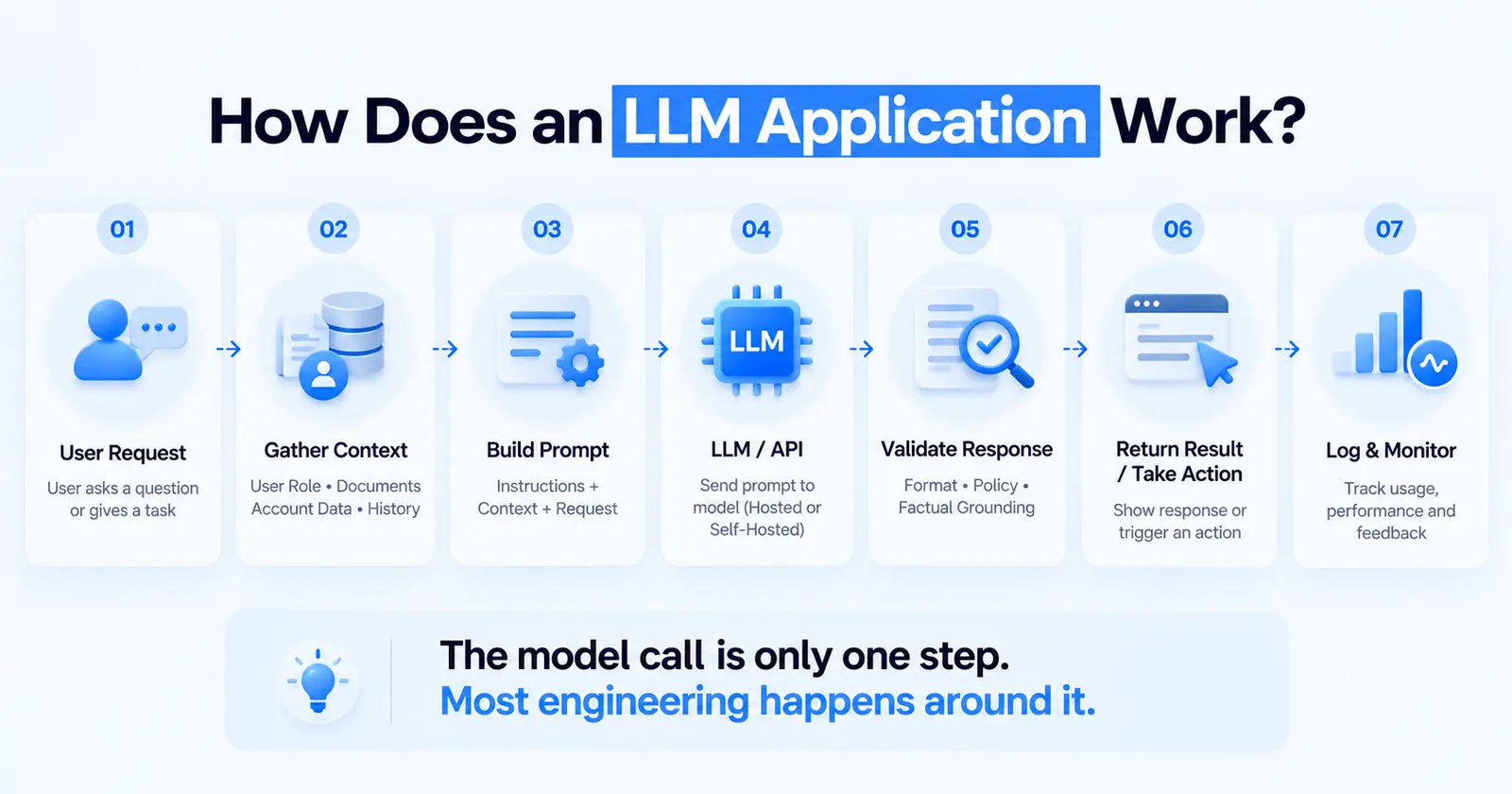
At its simplest, an LLM application follows a loop:
- A user or system sends a request.
- The application gathers whatever context the model needs: the user's role, relevant documents, account data, conversation history.
- It assembles a prompt from instructions, context and the request.
- It sends that prompt to a model, usually through an API.
- It checks the response: format, policy, factual grounding.
- It returns the result, or takes an action, and records what happened.
Steps 2, 5 and 6 are where most of the engineering lives. Step 4 is often a single function call.
LLMs vs. LLM-Powered Applications
An LLM is a general-purpose text engine. It knows a great deal about the world up to its training cutoff and nothing about your customers, your pricing rules, or yesterday's orders.
An LLM-powered application wraps that engine with the things it lacks: your data, your constraints, your workflows and a way to verify its output. When people say "the AI got it wrong," the fault is usually in the wrapper. The model was not given the right context, or nothing checked the answer before it reached a customer.
Why Businesses Are Building LLM Applications
Three things changed in the past two years. Model quality crossed the threshold where many language tasks (summarising, extracting, drafting, classifying) are good enough to automate with review. API pricing fell far enough that high-volume use became practical. And the surrounding tooling matured, so teams no longer have to invent retrieval, tracing and evaluation from scratch.
The result is that problems that used to need a dedicated machine learning team can now be handled by a strong software team that understands how to build around a model.
Benefits of LLM Application Development for Businesses
The benefits are real when the use case is well chosen. They disappear quickly when it is not.
Business Process Automation
Many business processes involve reading something unstructured and deciding what to do with it: an email, an invoice, a claim form, a support request. LLM applications can handle the reading and the first decision, routing the item or extracting the fields, and pass the exceptions to a person.
Intelligent Customer Support
Support assistants can answer routine questions from your own documentation, look up order status, and hand off to a human with a summary when a conversation gets complicated. The value comes from the handoff design as much as from the answers. We cover this in depth in our guide to AI chatbot development.
Knowledge Management
Most organisations have the answer to a question written down somewhere. Nobody can find it. An internal knowledge assistant that searches policies, wikis, tickets and past proposals, then answers with citations, is one of the most reliable early wins.
Personalized User Experiences
LLMs can tailor explanations, recommendations and onboarding to a user's context and history. The engineering challenge is doing this without leaking one user's data into another's session.
Content and Document Processing
Contract review, report drafting, proposal generation and document comparison are all language-heavy tasks where a model can produce a solid first draft for a human to finish.
Data and Workflow Automation
LLMs can turn natural-language requests into structured actions: create a ticket, update a record, run a report. This is where applications start to become agents, and where guardrails become essential.
Types of LLM-Powered Applications
AI Chatbots and Virtual Assistants
Conversational interfaces for customers or staff. The simplest version answers from a fixed knowledge base. More capable versions look up live data and take limited actions.
Enterprise Knowledge Assistants
Question answering over internal documents, usually built with retrieval so answers are grounded in your content and can cite their sources.
Document Analysis Applications
Extraction, classification and summarisation of contracts, invoices, medical records, applications and reports. These often run in batch rather than as chat.
AI Content Generation Applications
Drafting marketing copy, product descriptions, reports and emails, typically with brand guidelines and templates built into the prompt.
AI Search Applications
Search that understands intent rather than matching keywords, often combining traditional search with semantic search and a generated summary.
AI Coding Applications
Internal developer tools: code review assistants, test generators, migration helpers and documentation writers that work against your own codebase.
AI Agents and Workflow Applications
Applications where the model plans a sequence of steps and calls tools to complete a task. These carry the most risk and need the most engineering around permissions and verification. Our guide to AI agent development covers what it takes to make them reliable.
How to Build an LLM Application
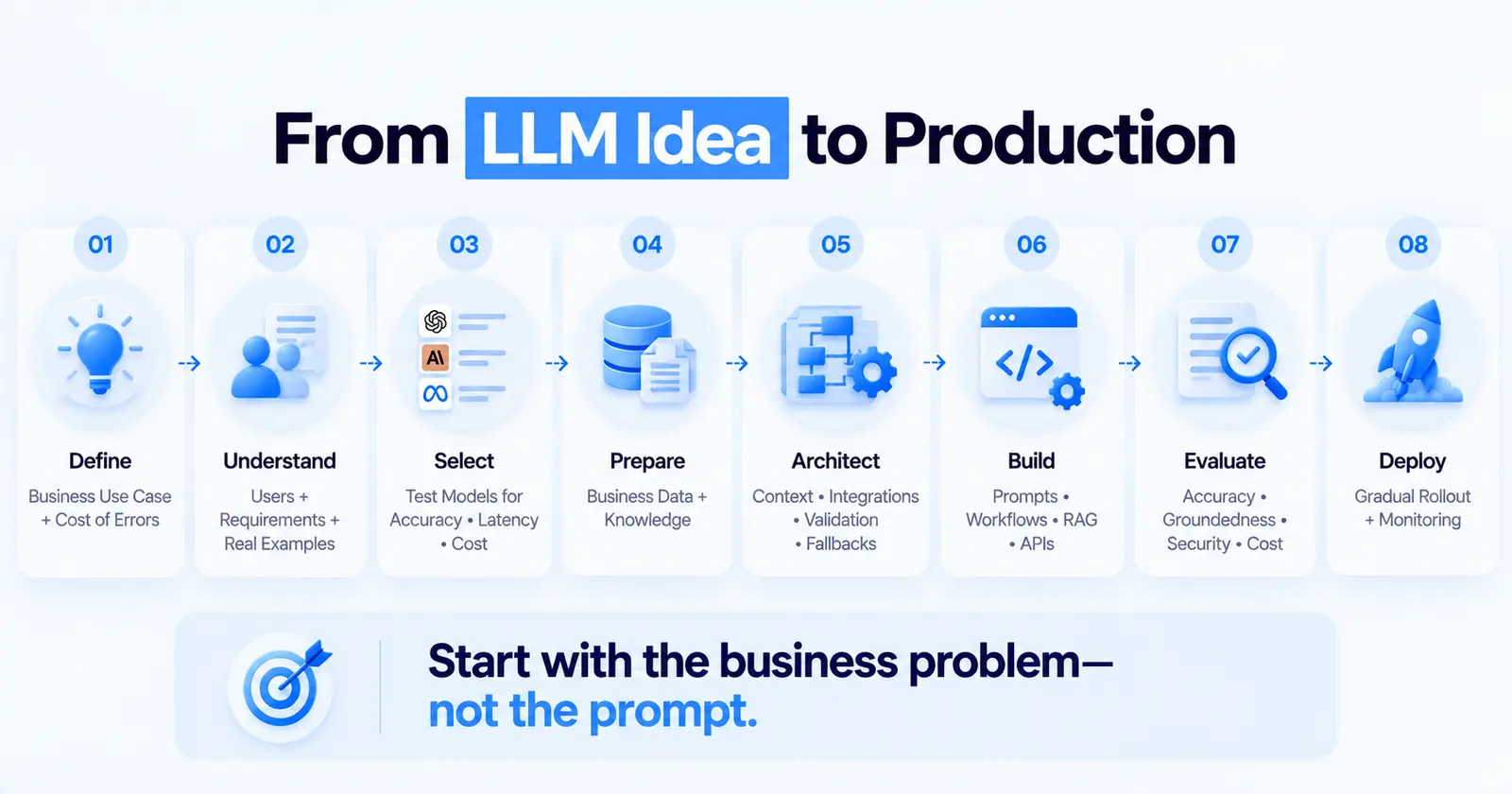
The order below matters. Teams that start at step 6, writing prompts, usually end up rebuilding.
1. Define the Business Use Case
Write down the task in one sentence, who does it today, how long it takes, and what a wrong answer costs. That last point decides almost everything else. A draft email a person will edit tolerates errors. A figure in a financial report does not.
2. Identify Users and Requirements
Who uses the application, what they are allowed to see, how fast it needs to respond, how many requests a day you expect, and what systems it must connect to. Collect 50 to 100 real examples of the inputs it will receive. These become your first test set.
3. Select the Right LLM
Choose on evidence, not on reputation. Run your real examples through two or three candidate models and compare accuracy, latency and cost per request. For many business tasks a smaller, cheaper model performs within a few points of the largest one. Also consider data residency and whether you need a provider that offers private deployment through your cloud account.
4. Prepare Business Data and Knowledge
Identify which documents and records the model needs, who owns them, how current they are, and who is allowed to see them. Poor source data is the most common reason LLM applications give confident wrong answers. If your data needs significant cleanup or pipeline work first, our guide to AI data engineering covers how to get it into shape.
5. Design the Application Architecture
Decide how requests flow, where context comes from, where outputs are checked, and what happens when the model fails or times out. We go deep on these decisions in our LLM architecture guide.
6. Implement Prompts and LLM Workflows
Write prompts as versioned code, not as text pasted into a dashboard. Keep instructions, context and user input clearly separated. Ask for structured output (JSON with a schema) wherever the result feeds another system, and validate it. Some providers can enforce the schema for you, for example OpenAI's Structured Outputs feature.
7. Add RAG Where Required
If the application needs to answer from your own documents, add retrieval so the model sees the relevant passages at query time. If it only needs to transform the input it was given, you may not need retrieval at all.
8. Integrate APIs and Business Systems
Connect to the CRM, ERP, ticketing system or database the workflow depends on. Give the application the narrowest permissions that let it do its job. Read access is very different from write access.
9. Test and Evaluate the Application
Run your test set on every change. Measure accuracy, groundedness, format compliance, latency and cost. Add every production failure to the test set so it cannot recur silently. Our LLM evaluation guide explains how to build this properly.
10. Deploy and Monitor the Application
Ship behind a feature flag or to a small group first. Log every request, the context retrieved, the prompt version, the response and the cost. Watch quality and spend from day one, not just uptime.
LLM Application Architecture
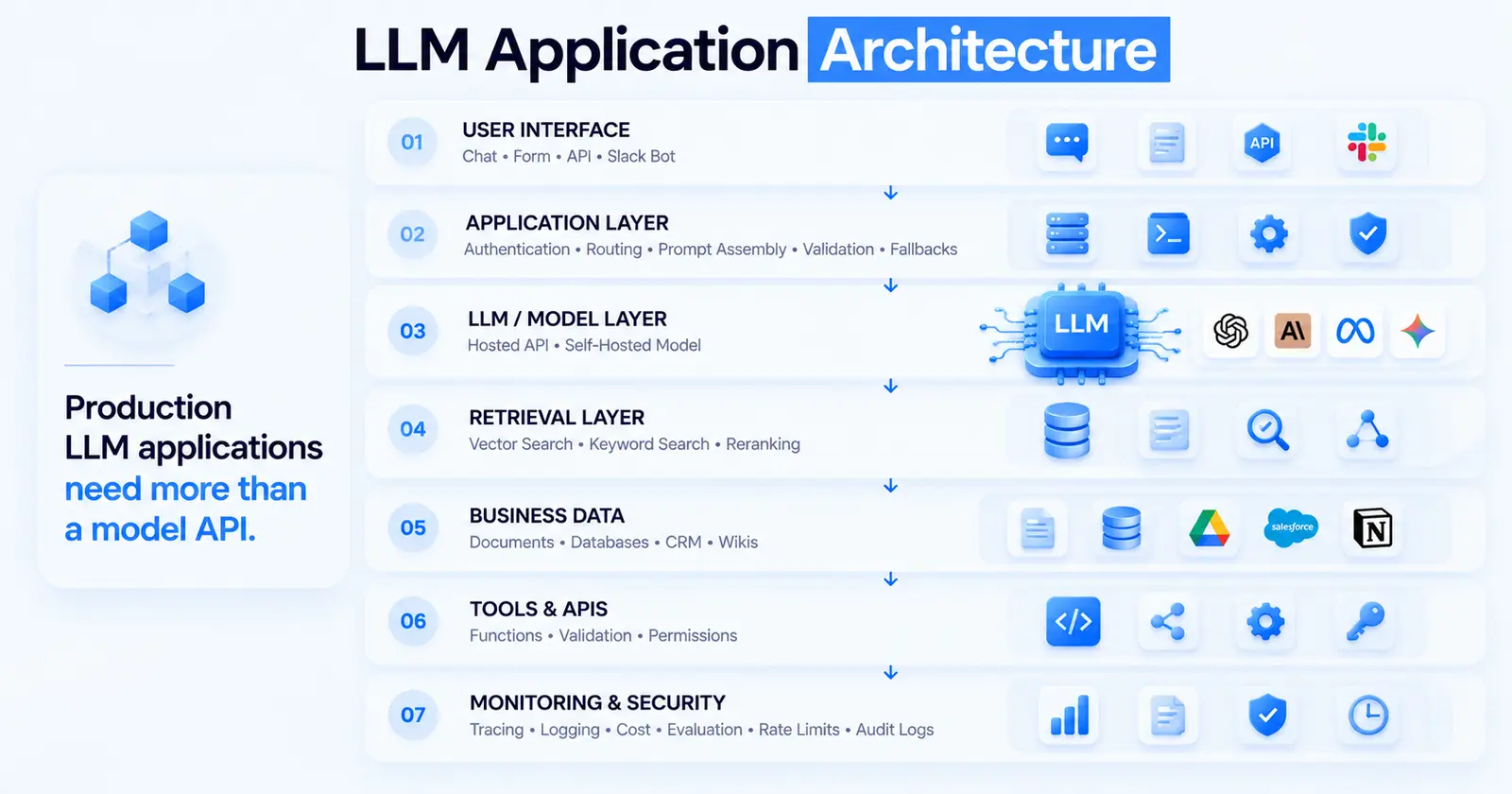
A production LLM application usually has seven layers. Small applications collapse some of them together, but each concern still needs an owner.
User Interface
Chat window, form, browser extension, Slack bot or an API with no interface at all. The interface should make it obvious when an answer is generated, show sources where possible, and give users a way to flag a bad response.
Application Layer
Your business logic: authentication, request routing, prompt assembly, output validation, retries and fallbacks. This is ordinary backend code and should be tested like it.
LLM API or Model Layer
The call to a hosted model API or a self-hosted model. Keep this behind a thin interface of your own so you can switch providers, route easy requests to cheaper models, and fall back when a provider has an outage.
Retrieval and Vector Database Layer
Where documents are chunked, embedded and searched. Many teams now combine vector search with keyword search, because exact terms such as product codes and clause numbers are often missed by semantic search alone.
Business Data and Knowledge Sources
The systems of record the application reads from: document stores, databases, CRMs, wikis. Freshness and permissions are enforced here, not in the prompt.
API and Tool Integration Layer
The functions the model is allowed to call, each with a defined schema, input validation and a permission check. Treat every tool as a public API that an untrusted caller might hit.
Monitoring and Security Layer
Tracing, logging, cost tracking, evaluation, rate limiting, input and output filtering, and audit logs. Bolting this on after launch is much harder than building it in.
LangChain for LLM Application Development
LangChain is the most widely used open-source framework for building LLM applications, and it is often the first thing teams reach for. Whether it is the right choice depends on what you are building.
What Is LangChain?
LangChain is a Python and JavaScript framework that provides standard interfaces for the pieces most LLM applications need: chat models from different providers, prompt templates, document loaders, text splitters, embeddings, vector stores, retrievers, tools and output parsers. Its companion projects are LangGraph, a runtime for stateful, multi-step agent workflows, and LangSmith, a hosted platform for tracing and evaluation.
Why Use LangChain for LLM Applications?
The main benefit is speed of assembly. Swapping one model provider for another is a one-line change. Loading a PDF, splitting it, embedding it and storing it in a vector database uses components that already exist. Tracing through LangSmith shows exactly what the model saw at every step, which is invaluable when debugging.
The trade-off is abstraction. For a simple application that calls one model with one prompt, LangChain adds layers you then have to understand when something goes wrong. Several teams we have worked with started with LangChain, then replaced parts of it with direct API calls once they understood their requirements. That is a reasonable path. Starting with the framework to learn the shape of the problem and then simplifying is often faster than designing everything by hand up front.
LangChain Components for Application Development
- Chat models: a common interface across OpenAI, Anthropic, Google, AWS Bedrock, Azure and local models.
- Prompt templates: reusable prompts with variables.
- Document loaders and text splitters: ingest PDFs, web pages, Office files and databases, then split them into chunks.
- Embeddings and vector stores: convert chunks to vectors and store them in Postgres with pgvector, Pinecone, Weaviate, Qdrant and many others.
- Retrievers: fetch relevant chunks for a query.
- Tools: Python or JavaScript functions the model can call.
- Output parsers and structured output: turn model text into typed objects.
LangChain for RAG Applications
LangChain's loaders, splitters, vector store integrations and retrievers cover the full RAG pipeline, which makes it a quick way to stand up a working prototype. Production RAG usually needs more care around chunking strategy, hybrid search, re-ranking and permission filtering than the defaults provide. Our guide to RAG development covers those decisions.
LangChain for AI Agents
LangChain's agent tooling now runs on LangGraph, which models an agent as a graph of steps with explicit state. That structure makes it easier to add checkpoints, human approval steps and retries than a free-running loop. For business agents, those control points are what separate a demo from something you can let near a real system.
LangChain for Enterprise Workflows
For enterprise use, LangChain's value is mostly in its integrations and in LangSmith's tracing and evaluation. Its weaknesses are version churn (the API has changed significantly across releases) and a large dependency tree. Pin versions, wrap the parts you use behind your own interfaces, and keep your business logic outside the framework so upgrades do not ripple through your codebase.
Developing LLM Applications With LangChain
Here is how the pieces fit together in practice. The examples use Python.
Connecting LLMs
LangChain gives every provider the same standard interface, so the rest of your code does not care which model sits behind it:
from langchain.chat_models import init_chat_model

model = init_chat_model("anthropic:claude-sonnet-5-5", temperature=0)
Setting temperature to zero makes outputs more consistent, which helps both testing and extraction tasks.
Building Prompt Templates
Keep instructions and user input separate, and tell the model what to do when it does not know:
from langchain_core.prompts import ChatPromptTemplate

prompt = ChatPromptTemplate.from_messages([
    ("system",
     "You answer questions about {company}'s refund policy using only the "
     "context provided. If the context does not contain the answer, say so."),
    ("human", "Context:\n{context}\n\nQuestion: {question}"),
])

chain = prompt | model
The | operator composes steps into a chain, so the formatted prompt flows straight into the model.
Adding Retrieval
With a vector store already populated, retrieval is a small addition:
retriever = vector_store.as_retriever(search_kwargs={"k": 4})

docs = retriever.invoke(question)
context = "\n\n".join(d.page_content for d in docs)
answer = chain.invoke({"company": "Acme", "context": context, "question": question})
In production you would also filter retrieved documents by the user's permissions before they reach the prompt.
Connecting External Tools
Tools are ordinary functions with a docstring the model reads to decide when to use them:
from langchain_core.tools import tool

@tool
def get_order_status(order_id: str) -> str:
    """Look up the current status of a customer order by its ID."""
    return orders_api.status(order_id)
Validate every argument inside the tool. The model will occasionally pass values you did not expect.
Building Chains and Workflows
Simple, fixed sequences work well as chains. When the application needs to branch, loop, wait for approval or recover from a failed step, move to a LangGraph workflow, where each step and transition is explicit and state is saved between steps.
Testing and Monitoring LangChain Applications
Turn on LangSmith tracing (or an open-source alternative such as Langfuse) from the first day of development. Build a dataset of real questions with expected answers and run it on every prompt or model change. Traces tell you what happened. The evaluation dataset tells you whether it was right.
LLM Application Development Technology Stack
LLMs and Model APIs
Hosted models from OpenAI, Anthropic and Google, available directly or through AWS Bedrock, Azure and Google Cloud Vertex AI. Open-weight models such as Llama, Mistral and Qwen for teams that need to self-host.
Programming Languages
Python dominates, thanks to its ecosystem. TypeScript is a strong choice when the application lives in a Node.js or Next.js codebase, and most major frameworks and SDKs support both.
LLM Frameworks
LangChain and LangGraph for general orchestration and agents. LlamaIndex for retrieval-heavy applications. Microsoft Semantic Kernel for .NET shops. Haystack for search-centric pipelines. Or no framework at all, using the provider SDKs directly.
Vector Databases
Postgres with pgvector is often enough and keeps your data in a database you already run. Pinecone, Weaviate, Qdrant and Milvus suit larger volumes or more demanding search requirements.
Traditional Databases
Postgres, MySQL or your existing system for users, permissions, conversation history, cached responses and audit logs.
Cloud Infrastructure
Containers on AWS, Azure or Google Cloud, serverless functions for lighter workloads, and GPU instances only if you are self-hosting models.
APIs and Integrations
REST and GraphQL APIs into your business systems, webhooks for event-driven flows, and the Model Context Protocol (MCP), which is increasingly used as a standard way to expose tools to models.
Monitoring and Observability Tools
LangSmith, Langfuse, Arize Phoenix and Helicone for LLM-specific tracing, cost and evaluation, alongside your usual application monitoring.
Best Tools for Enterprise LLM Application Development
Enterprise requirements add procurement, security review and governance to the technical choice.
LLM Platforms and APIs
AWS Bedrock, Azure OpenAI Service and Google Cloud Vertex AI let you use major models inside your existing cloud agreement, with data processing terms your security team has already reviewed. That often matters more than small differences in model quality.
LangChain and LLM Frameworks
LangChain and LangGraph have the broadest integration coverage. LlamaIndex is strong for document-heavy work. Semantic Kernel fits Microsoft-centric organisations.
Vector Databases
pgvector if you already run Postgres. Managed options such as Pinecone if you want no operational burden. Elasticsearch or OpenSearch if you already run them for search and want hybrid retrieval in one place.
Cloud Platforms
Whichever cloud your organisation already uses. The integration with identity, networking and logging you already have outweighs most platform differences.
MLOps and Observability Tools
LangSmith or Langfuse for tracing and evaluation, plus your existing monitoring stack for infrastructure. Choose tools that let you export traces, so you are not locked in.
Security and Governance Tools
Guardrails AI and NVIDIA NeMo Guardrails for input and output policies, cloud provider content filters, and your existing data loss prevention and identity tooling.
RAG in LLM Application Development
What Is Retrieval-Augmented Generation?
Retrieval-augmented generation (RAG) fetches relevant passages from your own content at query time and includes them in the prompt, so the model answers from your documents rather than from memory. The approach was introduced by Lewis et al. in 2020.
Why Businesses Use RAG
It grounds answers in current, authoritative sources, allows citations, respects document permissions, and updates the moment a document changes, without retraining anything.
RAG Architecture
An ingestion pipeline loads, cleans, chunks and embeds documents into a search index. At query time, the application retrieves the most relevant chunks, optionally re-ranks them, and passes them to the model with instructions to answer only from that context.
RAG vs. Fine-Tuning
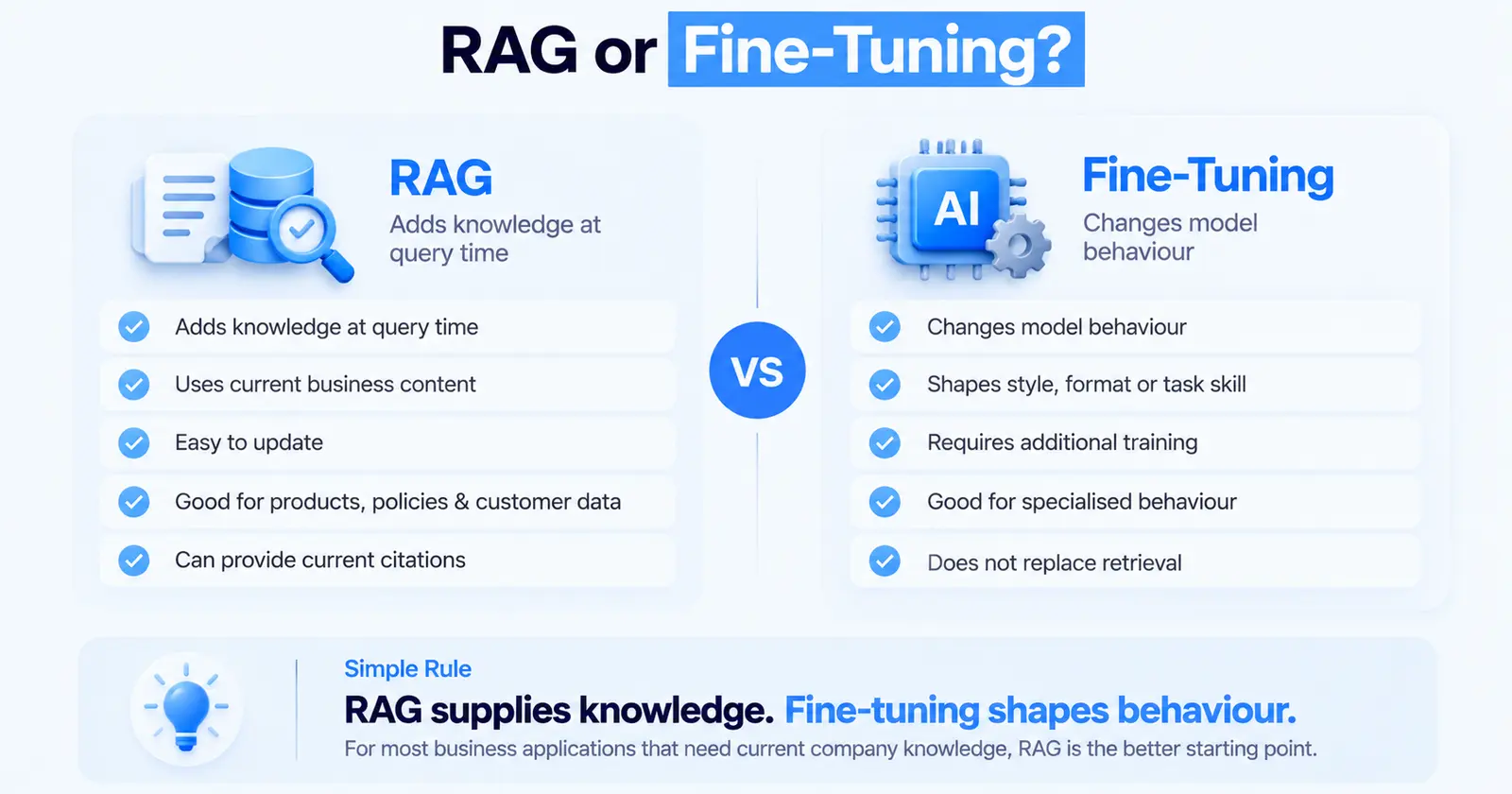
RAG changes what the model knows at the moment of answering. Fine-tuning changes how the model behaves: its tone, format, or skill at a narrow task. For most business applications that need to know about your products, policies or customers, RAG is the right starting point. Fine-tuning becomes worth considering when you need a consistent style or format that prompting cannot achieve, or when you want a smaller, cheaper model to match a larger one on a specific task. Our fine-tuning vs. prompt engineering framework walks through the decision.
Enterprise Knowledge Applications
Internal assistants over HR policies, engineering documentation, sales collateral, support history and legal templates are the most common enterprise RAG applications. The hard parts are keeping the index in sync with source systems and enforcing who can see what.
LLM Application Development Security
LLM applications introduce a new kind of attack surface: the model can be persuaded, through text, to do things you did not intend.
Data Privacy
Know what data leaves your environment, which provider processes it, where, and under what terms. Use enterprise API agreements that exclude your data from training. Remove or mask personal data the model does not need.
API Security
Keep provider API keys in a secrets manager, never in client-side code. Rate limit by user and by tenant. Set spending caps with your provider.
Access Control
Enforce permissions in the retrieval and tool layers, not in the prompt. If a user cannot open a document in your intranet, the assistant must not retrieve it for them. A prompt telling the model "do not reveal confidential documents" is not access control.
Prompt Injection
Any text the model reads, whether from a user, a retrieved document, an email or a web page, can contain instructions. Prompt injection is listed as the top risk in the OWASP Top 10 for LLM Applications. Treat model output as untrusted input to every downstream system. Limit what tools can do, require confirmation for consequential actions, and never let the model's output be executed directly as code or SQL against production.
Data Leakage
Prevent the model from echoing system prompts, other users' data or retrieved content the current user should not see. Isolate conversation history per user and per tenant.
Output Validation
Validate structured output against a schema. Check generated figures against source data where you can. Block responses that fail policy checks before they reach the user.
Audit Logging
Log who asked what, what was retrieved, which prompt version ran, what the model returned and what action was taken. You will need this for debugging, for compliance, and to answer the question "why did it say that?"
Testing and Evaluating LLM Applications
Traditional tests check that the same input gives the same output. LLM outputs vary, so testing measures quality across a dataset instead.
Response Quality
Does the answer address the question, follow the requested format, and match the expected tone? Score these with a mix of automated checks and human review.
Accuracy and Relevance
Compare answers against known-correct references for a set of real questions. For RAG, also check whether the right documents were retrieved.
Hallucination Testing
Check that every claim in the answer is supported by the provided context. Include questions the knowledge base cannot answer, and confirm the application says so instead of inventing a response.
Security Testing
Run prompt injection attempts, requests for data the user should not access, and attempts to misuse tools. Repeat these on every release.
Performance and Latency
Measure time to first token and total response time under realistic load. Streaming responses improve perceived speed considerably.
Cost and Token Usage
Track tokens per request and cost per successful task. A prompt change that improves accuracy slightly while doubling context size may not be worth it.
User Experience
Watch real users. Collect ratings and flagged responses. The failures users care about are often not the ones your test set covers.
Deploying LLM Applications Into Production
Cloud Deployment
Deploy the application layer in the same cloud and region as your data where possible, to reduce latency and simplify compliance.
API-Based Deployment
Expose the application through your own API, so other systems and interfaces can use it and you control authentication, rate limits and logging in one place.
Containerization
Package the application in containers for consistent environments across development, staging and production.
Scalability
The application layer scales like any web service. The constraints are usually provider rate limits and cost. Request higher limits early, and design for graceful degradation when you hit them.
Load Management
Queue non-urgent work, cache repeated queries, and route simple requests to faster, cheaper models.
Version Management
Version prompts, model choices, retrieval settings and tool definitions together. Record which versions produced each response, so you can compare and roll back.
Production Monitoring
Monitor quality as well as uptime: sampled evaluation of live responses, user feedback rates, retrieval hit rates, cost per task and latency. Model providers update their models, and behaviour can shift without any change on your side. Our guide to AI model deployment covers the infrastructure side in more depth.
Common LLM Application Development Challenges
LLM Hallucinations
Models produce fluent, plausible text whether or not it is true. Grounding with retrieval, instructing the model to say when it does not know, and checking claims against sources reduce this. None of them eliminates it.
Data Quality
Outdated, duplicated or contradictory source documents produce outdated, inconsistent answers. The application can only be as good as what it retrieves.
High Inference Costs
Long prompts, large retrieved contexts and multi-step agents multiply token usage. Costs that look trivial in a pilot can become significant at production volume.
Latency
Large models and long contexts are slow. Multi-step workflows add each step's latency together.
Security Risks
Prompt injection, data leakage and over-permissioned tools are the most common risks, and they require design-level mitigations rather than prompt wording.
Integration Complexity
Connecting to legacy systems, handling authentication across services and dealing with inconsistent data formats usually takes longer than the LLM work itself. Our guide to AI integration services covers this in detail.
Model Limitations
Models struggle with precise arithmetic, long chains of reasoning over many facts, and anything that happened after their training cutoff unless you supply it. Route those tasks to conventional code.
Scalability
Provider rate limits, context window limits and cost all constrain growth in ways a normal web application does not face.
Maintaining Application Quality
Quality drifts as documents change, users find new edge cases, and providers update models. Without continuous evaluation, it declines quietly.
LLM Application Development Best Practices
Start With a Clear Business Objective
Define the task, the success measure and the cost of an error before choosing any technology.
Choose the Right Model
Test candidates on your own data. Use the smallest model that meets your quality bar, and route only harder requests to larger ones.
Use RAG When External Knowledge Is Required
If answers depend on your content, retrieve it. Do not expect the model to know it or to learn it through prompting alone.
Design for Security From the Beginning
Enforce permissions in code, minimise tool privileges, validate outputs and log everything. Retrofitting these is expensive.
Evaluate Outputs Continuously
Maintain a test set, run it on every change, and grow it from production failures.
Optimize Token and Infrastructure Costs
Trim prompts, cache repeated responses, limit retrieved context to what helps, and set spending alerts.
Build for Scalability
Abstract the model provider, queue background work, and plan for rate limits before you hit them.
Monitor Production Performance
Track quality, cost and latency together. Uptime alone says nothing about whether the answers are right.
LLM Application Development vs. Custom LLM Development
LLM application development builds software around an existing model. Custom LLM development means training or substantially fine-tuning a model itself.
For most businesses, application development is the right choice. It is faster, cheaper, easier to maintain, and benefits automatically as providers release better models. Custom model work makes sense in narrow cases: strict requirements to run fully on your own infrastructure, a highly specialised domain where general models perform poorly even with good context, or very high volumes of a narrow task where a small tuned model saves significant inference cost. Our guide to AI model development explains how to choose between the approaches.
How Much Does LLM Application Development Cost?
Cost depends far more on scope, integrations and quality requirements than on the model. These are the drivers to plan around.
LLM and API Costs
Priced per token, so cost scales with request volume, prompt length, retrieved context size and the number of model calls per task. Agents that make several calls per request cost several times more than a single-call assistant.
Development Costs
Driven by the number of workflows, the complexity of the interface, and how much custom logic surrounds the model. A focused single-purpose assistant is a far smaller build than a multi-workflow platform.
Data and Infrastructure Costs
Document ingestion, cleaning, vector storage, hosting and logging. Messy or scattered source data raises this considerably.
Integration Costs
Each system the application reads from or writes to adds build and testing effort. Legacy systems without good APIs add the most.
Security and Compliance Costs
Access control design, data handling reviews, audit logging and compliance documentation. Regulated industries should plan for more here.
Maintenance and Monitoring Costs
Ongoing evaluation, prompt tuning, index updates, provider changes and support. Budget for this as a continuing commitment rather than a one-off. Our breakdown of AI software development cost explains each driver in more detail.
How Long Does LLM Application Development Take?
A focused proof of concept on real data typically takes two to four weeks. A production-ready first version of a single-purpose application, with retrieval, integrations, evaluation and monitoring, usually takes eight to twelve weeks. Multi-workflow platforms or agentic applications with several integrations commonly take three to six months.
The biggest variables are data readiness and integration access. Waiting on credentials and cleaning source documents regularly takes longer than building the LLM logic.
LLM Application Development Company: How to Choose the Right Partner
LLM Development Expertise
Ask to see production systems, not demos. Ask what went wrong after launch and how they fixed it.
LangChain and RAG Experience
Look for a team that can explain when they would use LangChain and when they would not, and how they tune retrieval beyond the defaults.
Enterprise Integration Capabilities
The partner should be comfortable with your systems of record, authentication and data formats, not just with model APIs.
Security Expertise
Ask how they handle prompt injection, permission enforcement and data leakage. Vague answers here are a warning sign.
Cloud and Deployment Experience
They should deploy into your environment, under your security controls, and hand over infrastructure you can operate.
Testing and Evaluation Capabilities
Ask how they measure quality before and after launch. "We test it manually" is not an evaluation strategy.
Post-Launch Support
LLM applications need ongoing tuning. Clarify who monitors quality, who updates prompts and indexes, and how quickly issues are handled.
LLM Application Development Services: What Should They Include?
AI Strategy and Use-Case Discovery
Identifying which problems an LLM application can solve well, estimating value, and ruling out use cases where the error cost is too high. Our AI consulting services guide covers this stage.
LLM Selection
Benchmarking candidate models on your data for accuracy, latency, cost and data handling terms.
RAG Development
Ingestion pipelines, chunking, hybrid search, re-ranking and permission-aware retrieval.
LangChain Development
Building with LangChain and LangGraph where they fit, and with direct SDK calls where they do not.
AI Agent Development
Tool design, workflow orchestration, human approval steps and safeguards for applications that take actions.
API and System Integration
Connections to CRMs, ERPs, ticketing systems, databases and internal APIs.
Security and Testing
Access control, injection defences, output validation, evaluation datasets and security testing.
Deployment and Monitoring
Containerised deployment, tracing, quality monitoring, cost tracking and alerting.
Maintenance and Optimization
Ongoing evaluation, prompt and retrieval tuning, model upgrades and cost optimisation.
When Should Businesses Build an LLM Application?
Build when you have a repeated, language-heavy task with meaningful volume, when the knowledge needed to do it is written down somewhere you can access, and when you can define what a good output looks like. Start with tasks where a person reviews the output, then move toward automation as your evaluation data shows the application is reliable.
Hold off when an off-the-shelf tool already does the job well, when the task needs exact answers that conventional code could compute, or when there is no one to own quality after launch.
Common Mistakes to Avoid When Developing LLM Applications
Choosing an LLM Without Evaluating the Use Case
Picking the most talked-about model and designing around it, rather than testing several models against real examples of the task.
Ignoring Data Quality
Indexing every document you have, including outdated and contradictory ones, then wondering why answers are inconsistent.
Overusing Fine-Tuning
Reaching for fine-tuning to teach the model facts. Fine-tuning shapes behaviour. It is a poor way to supply knowledge that changes.
Building Without RAG When Business Knowledge Is Required
Stuffing policies into a long system prompt or hoping the model already knows them, instead of retrieving the current version at query time.
Ignoring Security
Relying on prompt instructions for access control, giving tools broad permissions, and trusting model output in downstream systems.
Failing to Test Real-World Prompts
Testing with clean, well-formed questions written by the development team. Real users are terse, ambiguous and creative.
Underestimating LLM Costs
Projecting costs from a pilot with short prompts and few users, then discovering production prompts are several times longer and usage is far higher.
Skipping Production Monitoring
Launching without tracing or quality measurement, so problems surface through customer complaints rather than dashboards.
Ready to Build a Production-Ready LLM Application?
Have a use case in mind, or a prototype that works in a demo but not in production? A useful first conversation covers the task, the data the application needs, the systems it must connect to, and what a wrong answer would cost. Those four answers shape the architecture.
Talk to us about your use case. If an existing tool would solve the problem, we will say so. If your team wants to build these habits in-house, Praxismith, our training platform, teaches the verification and safeguard discipline production LLM work depends on.
Conclusion
LLM application development is software engineering with a probabilistic component in the middle. The model call is the easy part. The work that decides whether an application succeeds is everything around it: choosing the right use case, feeding the model accurate and permitted context, validating what comes back, integrating with real systems, and measuring quality continuously once it is live.
LangChain and similar frameworks speed up assembly, and they are worth using where they fit. They do not replace architectural judgement, evaluation or security design. Start narrow, test on real data, build the guardrails in from the start, and expand as evidence shows the application is reliable.
For the deeper dives, see our guides to LLM architecture, LLM evaluation, RAG development and AI agent development.
Sources
- Retrieval-Augmented Generation for Knowledge-Intensive NLP Tasks - Lewis et al., 2020
- LLM01:2025 Prompt Injection - OWASP Gen AI Security Project, 2025
- Structured Model Outputs - OpenAI, 2026
- Models - LangChain, 2026
- LangGraph overview - LangChain, 2026
- Model Context Protocol Specification - Model Context Protocol, 2026
Frequently Asked Questions
What is LLM application development?
LLM application development is the process of building software where a large language model performs part of the work, such as answering questions, drafting content, extracting data or deciding which action to take. It includes the interface, data access, integrations, security, testing and deployment around the model.
How does LLM application development work?
The application receives a request, gathers relevant context such as documents or account data, builds a prompt, sends it to a model, validates the response, and returns a result or takes an action. Most of the engineering effort goes into context, validation and integration rather than the model call itself.
How do you build an LLM-powered application?
Define the use case and the cost of errors, collect real example inputs, select a model by testing candidates, prepare your data, design the architecture, implement prompts as versioned code, add retrieval if needed, integrate business systems, evaluate against a test set, then deploy gradually with monitoring.
What is LangChain used for in LLM application development?
LangChain provides standard building blocks for LLM applications, including model interfaces across providers, prompt templates, document loaders, vector store integrations, retrievers, tools and output parsers. LangGraph adds stateful agent workflows, and LangSmith adds tracing and evaluation.
Can you develop LLM applications with LangChain?
Yes. LangChain is widely used for chatbots, RAG applications and agents. It speeds up prototyping considerably. For production, pin versions, keep business logic outside the framework, and replace components with direct API calls where the abstraction adds more complexity than it saves.
What is the difference between RAG and fine-tuning?
RAG retrieves relevant information from your content at the moment of answering, so the model works from current, citable sources. Fine-tuning further trains a model to change its behaviour, such as its style, format or skill at a narrow task. RAG supplies knowledge. Fine-tuning shapes behaviour.
What tools are used for enterprise LLM application development?
Common choices include model access through AWS Bedrock, Azure OpenAI or Google Vertex AI, frameworks such as LangChain, LangGraph and LlamaIndex, vector databases such as pgvector, Pinecone or Qdrant, observability tools such as LangSmith or Langfuse, and guardrail tools such as Guardrails AI or NeMo Guardrails.
How much does LLM application development cost?
Cost depends on scope, the number of integrations, data readiness, security requirements and usage volume. The main components are development effort, model API usage, data and infrastructure, integration work, compliance, and ongoing maintenance and monitoring.
How long does it take to develop an LLM application?
A proof of concept typically takes two to four weeks. A production-ready single-purpose application usually takes eight to twelve weeks. Complex multi-workflow or agentic applications commonly take three to six months, depending mostly on data readiness and integration access.
How do you secure an LLM application?
Enforce permissions in the retrieval and tool layers rather than in prompts, keep API keys server-side, minimise tool privileges, defend against prompt injection by treating all model output as untrusted, validate outputs, isolate user data, and keep audit logs of every request and action.
How do you reduce LLM application costs?
Use the smallest model that meets your quality bar, route only complex requests to larger models, trim prompts and retrieved context, cache repeated responses, batch non-urgent work, and monitor cost per completed task so regressions are caught early.
How do you deploy an LLM application into production?
Package the application in containers, deploy it in your cloud close to your data, expose it through your own authenticated API, roll it out gradually behind a feature flag, and monitor quality, latency, cost and errors from the first day.
What is an LLM application development company?
An LLM application development company designs, builds, deploys and maintains software products powered by large language models. That covers use-case discovery, model selection, RAG, integrations, security, evaluation and ongoing optimisation.
What should I look for in an LLM application development company?
Look for production case studies rather than demos, a clear evaluation methodology, concrete answers on security and prompt injection, experience integrating with systems like yours, and a defined plan for monitoring and improving the application after launch.
